← Back

Mini

Your sample library,
Visualized, Playable.

$49$35 ex.VATEnds Jul 19
Documentation
Features
2D scatter plot with configurable XY axes
Handles tens of thousands of samples
Hover to preview, click to trigger, drag to DAW
Drag and drop from/to plugin
Draw MIDI line across the plot and play via MIDI, adjust the curve
Attack / Release envelope with 64-voice polyphony to create textures
Pitch / Pan / Start position randomization ranges
Velocity slider with MIDI velocity sensitivity
Gesture - record a mouse gesture, play it back via CC1/slider/automation
Quantized playback for gesture playback
XY cursor automation parameters
Mouse to Automation - record mouse movement as automation
Loop detection on MIDI input
Sample Pool - collect samples before bulk dragging to DAW
Duplicate detection - true duplicates and timbral duplicates, with solo/mute/remove/trash
Search box with optional metadata search
Folder preset system (save / load / rename / delete)
Folder groups with Ctrl+0-9 / CC4 solo switching
Favourites - save samples to a favourites folder
Zoom, pan, length filter
Per-device caching
200-sample demo
VST3/AU, Windows/macOS/Linux
System Requirements
Windows 10+ (64-bit) - VST3
macOS 10.13+ (Apple Silicon) - VST3, AU
Linux (64-bit) - VST3
4 GB RAM minimum
Any VST3/AU compatible DAW
Internet required for license activation
Demos eksau
AudioMap

Rave

Share sliders with the world - What could go wrong?
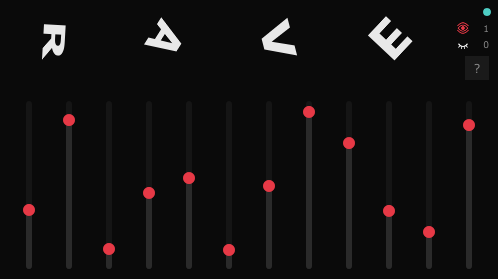
Rave plugin screenshot
Free
Features
12 automation lanes synced globally
See who's online in real-time
MIDI CC output for any parameter
Works across DAW instances worldwide
VST3 + AU for Windows & macOS

???

Something new is coming.

New plugin preview

Stay tuned.

Zap

A raw PCM pulse instrument.

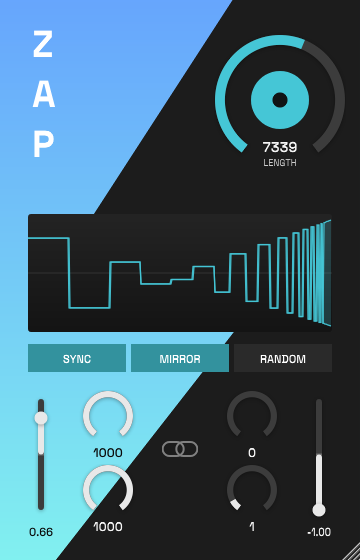
Zap plugin screenshot
Free

Zap is a raw PCM pulse instrument. Instead of oscillators, all sounds are created with raw sample values. Choose the length in samples (from only two samples to full 65536 samples), pulse amplitude, width and length in samples.

Bottom screen splits into two parts, the "start" and "end" values which it interpolates between. This means the results range from simple one-sample clicks, simple triggers for sidechain to sound effects, reversed sounds, kicks, to beeps and more. Because all parameters are exposed as automation parameters, you can hook them to external modulators to shape the sounds.

There are three types of triggers - manual, either by clicking the large button on top, or toggling Sync on, or playing a MIDI note. middle C (MIDI value 60) plays the sound at original speed, playing an octave higher plays it twice the speed and vice versa.

Features
Raw-PCM pulse instrument - no oscillators, no samples
A pulse train that morphs from a START column to an END column
Bipolar amplitude, per-column pulse length & gap
Mirror gaps into negative for a fuller, square-ish tone
Link START/END for a uniform train
MIDI-triggered and pitch-mapped (C3 = base speed)
Trigger button, DAW-synced auto-trigger, and Randomize
Live waveform display
VST3/AU, Windows/macOS/Linux
System Requirements
Windows 10+ (64-bit) - VST3
macOS 10.13+ (Universal) - VST3, AU
Linux (64-bit) - VST3
Any VST3/AU compatible DAW
Get notified about updates.